User Interface
Overview
The UI Framework reveals the main navigation and the content areas. There are three main areas on the Accounting System are:
- Sidebar
- Navigation Menu
- Content Area
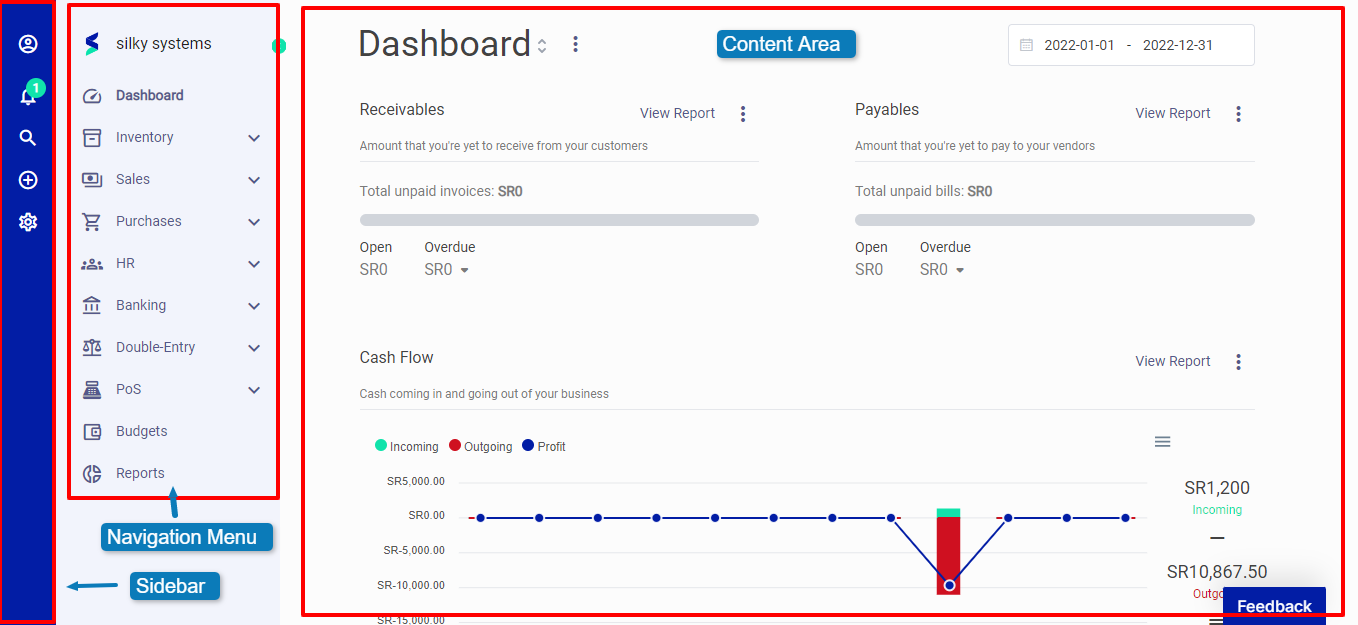 Figure.01 User Interface
Sidebar
The Sidebar is a section for navigating through your workspace. The section helps you personalize your profile and company and can be collapsed or expanded with a click of the collapse menu icon.
Expanding the menu pans out options that allow you to navigate the workspace and handle your daily to-dos with a couple of clicks.
On the side, you have icons for easy access to: Profile, Notifications, Search, Quick Add, and Settings.
Profile
Here, you can personalize your profile - update the company's name, users, and roles. You can log out through the profile menu.
Notifications
The bell-shaped icon displays in-app notifications. The system notifies you of recurring records you may need to take action on. Announcements on The system or alerts for the applications you are subscribed to will also appear here.
Search
You can search globally for all records created on your account. This includes items, invoices, transactions, and more. Click on the magnifier and search for any record from customers to expenses.
Quick Add
The plus (+) icon allows you to easily create estimates, sales order, tax invoice, income, customer, purchase order, bill, expense, and vendor without navigating to their main pages.
Settings
The Sidebar section also contains the settings menu where you can personalize the Accounting system. Settings allow you to customize how your Accounting system behaves - make changes to your company, choose a default currency, define your financial year, and configure installed apps. Take a step further for more personalization in settings.
Help
Get access to the support page where you can submit tickets, or speak to dedicated support personnel.
Favorites
This part of the Sidebar is an easter bunny. When you favorite a page, it appears on the Sidebar for quick access from any page. You can add a page to favorites by clicking on the star icon at the top, beside the title. All favorite pages appear on the Sidebar.